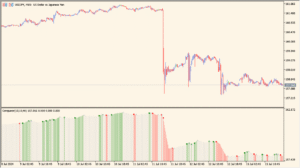
Overview of the Time Bar Custom Indicator

The Time Bar Custom indicator for MT4 allows traders to mark specific times on the chart with vertical lines. It’s a simple yet effective tool for visualizing key time points, such as session openings, economic events, or custom time markers that fit your trading strategy. By highlighting these moments, traders can easily identify patterns or behaviors tied to specific hours or minutes of the trading day.
This tool doesn’t provide signals or analysis; instead, it improves time awareness and helps maintain consistency in observing certain market periods or setups that occur at fixed times.
How to Use It in Practice

In practice, you can use the Time Bar Custom indicator to mark:
- Daily or session opening times, such as London or New York open.
- Specific news release times that impact your trading strategy.
- Custom reference points for time-based trading systems.
- Important intraday intervals you want to monitor consistently.
Once the time settings are adjusted, the indicator automatically draws vertical lines at the specified hour and minute, helping you maintain a visual schedule across different sessions.
Parameter Explanations

Время установки бара (Часы)
Sets the hour when the vertical line should appear on the chart. Use this to align with session starts or custom time markers.
Время установки бара (Минуты)
Defines the specific minute of the hour for drawing the line. This gives precise control over the placement, useful for timing around economic releases or strategy-based triggers.